When the email landed in my inbox showcasing the Instrumments 01 Dimensioning Instrument, that exact thought lit up in my brain, and I immediately blurted out - loud enough for the entire office to hear - “I really want that!” A rolling wheel, not much bigger than a pen, capable of digitally measuring objects with curvature the same way a surveyor’s trundle wheel traverses uneven ground. A laser guide. Extreme accuracy down to 0.1 millimeters. A sleek, modern design that wouldn’t look out of place in an architect’s drafting room. On paper, the Instrumments 01 read like the definitive answer to every curve‑measuring headache I’d ever nursed.
But after weeks of putting the pencil version through its paces - measuring off blueprints, tracing templates, and trying to integrate it into real‑world shop and office workflows - I’ve learned that the gap between a brilliant concept and a dependable daily‑driver tool can be frustratingly wide. The Instrumments 01 is absolutely fascinating. It can do things no tape measure can. But whether it earns a permanent place in your tool collection depends entirely on your tolerance for a steep learning curve, a mandatory phone‑tethering app, and a precision‑versus‑repeatability tradeoff that will test your patience on every measurement. Let’s roll through every detail, from the writing quality to the app dependency, and see where this instrument shines - and where it stumbles.
First Impressions : A Dimensioning Instrument That Looks Like a Design Object
Open the box and the Instrumments 01 immediately communicates that it is not a conventional construction tool. Available in three configurations - a pen, a pencil, and a standalone shorter tool - the version I evaluated was the pencil. The body is machined from aluminum and steel, with a simple, uninterrupted taper that feels solid without being heavy. There are no rubber overmolds, no bright safety colors, no belt clips. This instrument is styled to sit on an architect’s desk, next to a Moleskine notebook and a precision mechanical pencil, and it pulls off that aesthetic confidently.
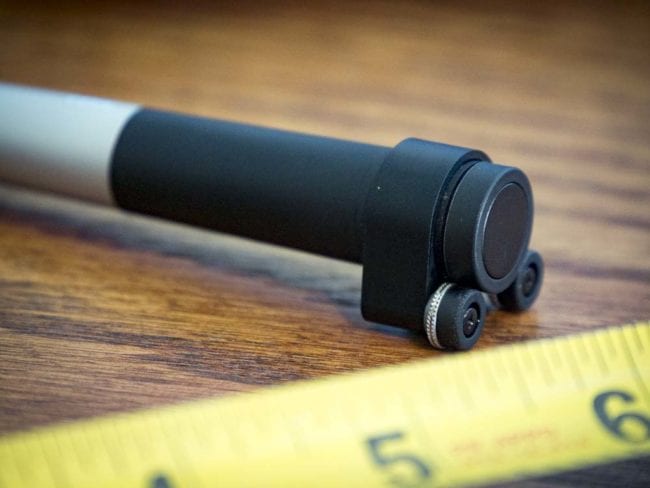
At the business end, a small rolling wheel protrudes from the tip, flanked by a laser guide that projects a faint red line onto the surface as you trace. The wheel is free‑spinning, with no detents or clicks - it glides smoothly, which is crucial for capturing the subtle nuances of a curved line. Opposite the wheel, the tool writes like a normal pencil. The graphite core is roughly the diameter of a standard #2 pencil, and a three‑pack of refills (six leads per pack) runs $16. It writes effectively, with a comfortable balance point despite the lack of a sculpted grip. If you’re accustomed to drafting pencils, you’ll find the feel familiar; if you’re coming from a jobsite carpenter’s pencil, it will seem delicate, but that’s exactly the point. This is an instrument, not a beater.
The standalone tool version omits the writing function entirely, shrinking the form factor to something that slips into a pocket protector. The pen version swaps graphite for a ballpoint ink cartridge. All three variants share the same core measurement technology and Bluetooth connectivity, so your choice comes down to whether you want a writing tool, and if so, which medium you prefer.
How It Works : The Miniature Trundle Wheel Meets the Smartphone Era
If you’ve ever watched a surveyor walk a landscape with a trundle wheel, clicking off distance as the wheel rolls along the ground, you already grasp the Instrumments 01’s fundamental principle. Shrink that wheel down to the diameter of a pencil eraser, put it at the tip of a pen, and link it to the processing power of your smartphone, and you have a dimensioning instrument that can capture not only straight‑line distances but also the exact length of any contoured path the wheel traces.
A laser line projects from just beside the wheel, giving you a visual reference that helps you stay on the line you intend to measure. As you roll the instrument along the edge of a blueprint symbol, a template curve, or a physical object, the wheel’s rotation feeds data to an internal encoder. That raw rotation count travels via Bluetooth to the Instrumments App on your Android or iOS device, where the software converts it into a distance reading, displayed in either metric (millimeters) or imperial (inches) units with a resolution of 0.1 mm or 0.01 inches.
This is not a standalone tool. Without the app - and therefore without a charged smartphone - the Instrumments 01 is just an expensive pencil. The app is the brain; the instrument is the sensor. This architecture allows the tool to achieve a level of processing sophistication that would be impossible to cram into the pen’s slim body, but it also ties the instrument’s usefulness to the reliability of your phone’s Bluetooth stack, its battery state, and your willingness to whip it out every time you need to measure something.
Power and Cost of Ownership : Six‑Month Battery Life and a $20 Battery Bill
The Instrumments 01 is powered by a small, user‑replaceable cell battery - the kind that slides into a tiny compartment and promises a claimed six months of operation. How accurate that six‑month figure is depends entirely on your daily usage patterns. If you’re measuring hundreds of lines a day in a production environment, expect to swap batteries more frequently. A two‑pack of replacement batteries costs $20, which is not trivial for a disposable component. Since the batteries are not rechargeable, you’ll want to factor that ongoing cost into your ownership calculation right alongside the graphite refills and the optional monthly app subscription.
The financial picture stacks up like this : the instrument itself costs $149. Refills for the pencil are $16 for an 18‑lead pack. Batteries are $20 per two‑pack. And if you want the full functionality of the app - most critically, the ability to export measurement data directly into CAD drawings - you’ll need to subscribe at $10 per month. That’s a potential total first‑year cost of $149 + (let’s say) one set of batteries and one set of leads ($36) plus $120 in subscription fees, landing you at $305 before you’ve measured a single paid job. For a freelancer or a small shop, that number isn’t astronomical, but it’s well above the price of a premium tape measure, a digital caliper, or even some entry‑level laser distance measurers. The Instrumments 01 is competing not just on capability, but on the argument that its unique contour‑measuring ability justifies a fully loaded cost that nudges into the territory of more versatile tools.
Writing Quality : An Architect’s Pencil That Happens to Measure
Because I received the pencil variant, I can speak directly to the writing experience. The graphite is thick - similar to what you’d find in the center of a #2 pencil. It lays down a clean, dark line that erases cleanly, and the minimum of moving parts in the writing mechanism means there’s virtually no tip wobble. The tapered aluminum body lacks any ergonomic contouring, and yet I found it surprisingly comfortable over extended drawing sessions. The smooth finish doesn’t get slippery even with slightly damp fingers, and the weight - noticeably heavier than a typical wooden pencil but lighter than a machined bolt‑action pen - feels substantial without inducing fatigue.
If you are an architect, an interior designer, or a detail‑oriented craftsperson who frequently sketches and then needs to pull dimensions from those sketches, the dual‑function nature of the instrument makes a lot of sense. You can sketch a curved staircase profile, then immediately trace that curve with the wheel to get its true developed length, all without switching tools. For the pure builder who only picks up a pencil to mark a cut line on a 2x4, the writing function is a bit beside the point - in that case, the standalone measurement tool without the writing feature might be the more cost‑effective route.
The App : Your Mandatory Command Center, for Better and Worse
Downloading the Instrumments App is not optional; there is literally no way to use the instrument without it. Pairing over Bluetooth is straightforward - the app found the tool within seconds on my first attempt, and subsequent connections re‑established automatically whenever I woke the tool from its auto‑sleep. That said, I did encounter a couple of random disconnections during my evaluation period, but I experience those intermittently with other Bluetooth devices on this particular phone, so I’m inclined to blame my aging handset rather than the instrument itself. Still, it’s worth noting that a Bluetooth hiccup mid‑measurement means you lose that trace and have to start over.
Once connected, the app’s interface is clean and logically laid out. You can toggle between metric and imperial units with a tap, check the remaining battery status of the instrument, and initiate a calibration sequence every time you power up. The app supports saving multiple measurements and performing basic arithmetic - you can sum a series of measurments to get a total length, calculate area, or compute volume. The real pro‑grade functionality lives behind the $10 monthly subscription. Paying that fee unlocks the ability to export your measurement data into CAD software, a feature that could streamline the workflow of any designer who needs to translate a physical template or a hand‑drawn curve into a precise digital model.
The catch with running everything through your phone is exactly what you’d expect : your phone’s screen must be on and unlocked to read the measurement. Most smartphones aggressively manage their display sleep timers to conserve battery, and having to tap your screen to wake it up between every measurement quickly becomes tiresome. Imagine tracing a series of short segments on a blueprint - the screen goes dark after 30 seconds, and you find yourself juggling the instrument, the phone, and the blueprint, constantly tapping to keep the reading visible. In a quiet office with the phone propped up on a stand, this is manageable. On a noisy, dusty jobsite where your phone is in your pocket because you need both hands, it’s a dealbreaker. The Instrumments 01 is at its absolute best in a controlled environment - an architectural office, a design studio, a cabinetmaker’s bench - where you can set the phone next to your work and interact with it easily. It is not a tool you’ll want to rely on while standing on scaffolding in the wind.
Accuracy and Precision : A Tale of Two Measurements
Let’s sharpen our terminology here, because accuracy and precision are often thrown around interchangeably, and the distinction matters deeply when evaluating a digital measuring tool. Accuracy refers to how close a measurement is to the true, known value - if the object is exactly 12.000 inches, does the tool read 12.000 inches, 11.990 inches, or 12.045 inches? Precision (or repeatability) is the tool’s ability to deliver the same reading again and again when measuring the exact same thing under the same conditions.
On the accuracy front, the Instrumments 01 boasts a stated resolution of 0.1 mm in metric mode and 0.01 inches in imperial mode. That’s impressive - 0.01 inches is roughly a quarter of the thickness of a typical credit card, and it’s significantly finer than the 1/16‑inch (0.0625‑inch) tolerance most construction trades consider acceptable. In my head‑to‑head tests against my most accurate tape measure, the Instrumments 01 could approach the reference value, frequently landing within 0.02 to 0.05 inches of the known dimension. Close, but rarely perfect. That’s not a dealbreaker for many applications - if you’re measuring a curve for a piece of trim that will later be sanded to fit, being off by a few hundredths of an inch is inconsequential. But it does mean that for high‑precision work where every thousandth counts, you’ll want to verify with a second method.
Precision, though, is where the Instrumments 01 reveals its temperament. I measured the same 4‑inch straight edge ten times in a row, carefully following the same path with the training wheels installed, and I never got an identical data set twice. The closest two measurements were within 0.01 inches of each other - a genuinely excellent result - but most pairs diverged by more than 0.1 inches, and a few wandered by over 0.25 inches. That level of inconsistency makes the tool challenging to trust for any application where repeatability matters. If you’re checking something for quality assurance, you need to know that the reading you get the first time is the reading you’ll get the fifth time. With the Instrumments 01, you simply don’t get that guarantee.
The Training Wheels : A Helpful Crutch That Still Leaves a Limp
Instrumments ships the 01 with a pair of clip‑on training wheels - small outriggers that flank the measurement wheel and stabilize the instrument against the surface. The idea is that by keeping the tool perpendicular to the measuring plane and preventing tilt, the training wheels eliminate one of the biggest sources of user‑introduced error. Getting the training wheels onto the instrument requires more force than you’d expect; I had to give them a firm shove until they audibly clicked into position, and I initially hesitated for fear of breaking the adapter. But once seated, they do make the tool noticeably easier to track in a straight line.
With the training wheels engaged, my measurement consistency improved - not dramatically, but measurably. The wildest outliers shrunk, and the average deviation from the known value tightened up. Yet even with the wheels, the repeatability never reached a level that would convince me to leave my tape measure in the toolbox for flat measurements. The fundamental problem is not just tilt; it’s the sensitivity of the wheel and the difficulty of establishing a perfectly clean start and stop.
Why It Drifts : The Micro‑Movements That Sabotage Repeatability
To understand why the Instrumments 01 struggles with precision, you have to appreciate just how sensitive the wheel is. Simply setting the wheel down on a sheet of paper and picking it straight back up generates a tiny, non‑zero measurement - the act of contact alone rotates the wheel by a fraction of a degree. My hands are steady by carpentry standards, but they are not surgeon‑steady, and the instrument magnifies every micro‑wobble. If my wrist pronates half a degree as I place the tool down, the wheel registers that rotation as travel. When I try to stop exactly at a line, the slight side‑to‑side correction I make before lifting the tool adds a fraction of a millimeter to the recorded distance.
With curves, the problem compounds. The laser guide is a single straight line; it cannot project the exact curved path you intend to follow. You must steer the wheel by eye, keeping the laser dot centered on the line while moving the tool at a smooth, consistent speed. Any deviation - a slight overshoot, a hesitation that causes the wheel to rock backward - instantly corrupts the measurement. The app does not offer a way to edit or trim a captured trace; it’s all or nothing. One shaky millimeter, and you either accept the error or redo the entire trace.
A potential engineering solution would be to give the wheel a tight pawl system - similar to the mechanism inside SK’s X‑Frame ratcheting wrenches - that clicks through discrete increments. That would dramastically improve repeatability because each click would correspond to an exact, known rotation. The tradeoff, of course, is resolution : a pawl can’t realistically deliver 0.1 mm precision because the physical detents would be too fine to manufacture at this scale. The Instrumments 01’s designers chose ultimate resolution over mechanical repeatability, betting that users would develop the hand skills to drive the tool accurately. For some, that bet will pay off. For me, and I suspect for a large chunk of the professional market, it results in a tool that feels more like a suggestion than a measurement.
Real‑World Applications : Where the Instrumments 01 Makes Sense - and Where It Doesn’t
Let’s cut through the lab‑coated analysis and talk about actual jobs. Who is the Instrumments 01 really for, and who should pass on it without guilt?
Ideal Scenarios:
- Architects and Designers Measuring Blueprints: In a well‑lit office, with the phone propped on a stand and the training wheels on a flat vellum surface, the instrument can capture the length of a curved hallway, a winding stair rail, or an organically‑shaped building footprint directly from a scaled drawing. The CAD export subscription turns this into a direct pipeline from physical blueprint to digital model.
- Pattern Makers and Template Craftsmen: If you’re developing sewing patterns, leatherwork templates, or custom upholstery pieces, the ability to trace a curved seam allowance and instantly know the exact length is game‑changing. The 0.1 mm resolution matters a lot when you’re cutting expensive fabric.
- Cabinet and Millwork Shops Producing Curved Parts: A radiused cabinet door rail, a curved molding, a serpentine front desk - these all require you to know the developed length of the curve to order material and set up jigs. Tracing the curve with the Instrumments 01 is faster than flexible curve rules and offers digital capture that can feed directly into CAM software.
- Hobbyists and Model Builders: For someone building scale models, architectural miniatures, or custom RC parts, the instrument’s fine resolution and curve‑following capability fill a genuine gap between a ruler and a high‑end CMM.
Questionable Scenarios:
- Jobsite Carpentry and Framing: The instrument is too delicate, the phone dependency too cumbersome, and the accuracy requirement for rough framing too lax to justify the cost and hassle. A tape measure and a set of trammel points will handle any curve you’ll encounter on a stud wall.
- Concrete and Masonry Work: Dust, grit, and moisture are the enemies of a sensitive encoder wheel and a smartphone. The IP rating is not specified for wet or dirty environments, and the cost of batteries and potential damage makes this a poor choice for outdoor construction.
- Anyone Who Needs Instant, Unambiguous Readings: If you demand to glance at a tool and see the measurement without fumbling for a phone, keep looking. The Instrumments 01 is a two‑hand, two‑device operation, and that friction alone will discourage use in high‑tempo environments.
- Precision Machinists and Metrologists: The repeatability concerns I’ve documented make the instrument unsuitable for inspection‑grade work where traceability and uncertainty budgets are required. It’s a design and layout tool, not a quality‑control instrument.
A Learning Curve Worth Climbing? The User’s Role in Accuracy
I’ll be the first to admit that my struggles with the Instrumments 01 are in part a reflection of my own technique. This is a tool that rewards practice, a calm hand, and a methodical approach. In the right hands - perhaps those of a professional illustrator or a watchmaker accustomed to steady‑hand tasks - the repeatability might tighten significantly. I noticed a gradual improvement over my evaluation weeks; my first‑day measurements were far noisier than the ones I captured on day ten. The calibration routine, performed before each session, also helps compensate for environmental factors like temperature.
If you commit to using the instrument daily, in a controlled environment, with the training wheels attached and the phone in a fixed, easily viewable position, you will likely get results that satisfy your needs. But that level of accommodation is a lot to ask of a $149 tool that already requires a monthly subscription to unlock its most valuable feature. It feels like Instrumments designed the 01 for a very specific, almost idealized user - one with the patience of a lab technician and the budget of a design‑firm partner.
Comparing the Instrumments 01 to Traditional Alternatives
To decide whether the Instrumments 01 is worth your investment, it helps to lay out what you’d use instead.
| Method | Pros | Cons |
|---|---|---|
| Flexible curve ruler + tape measure | Inexpensive, no batteries, no app, direct reading | Awkward for long or complex curves, prone to slipping, no digital output |
| Contour gauge | Perfect for transferring profiles, under $30 | Measures only short segments, no length output |
| Digital length meter / planimeter | Accurate, standalone, no phone required, some have curve modes | Can be expensive ($200+), less portable, limited to flat surfaces |
| Laser distance measurer + point tracing | Fast for straight lines, easy digital capture | Cannot trace curves; requires discrete point‑to‑point measurement |
| Instrumments 01 | Curve tracing with high resolution, digital capture, CAD export possible, dual‑function writing tool | Poor repeatability, phone dependency, subscription cost, delicate, learning curve |
The Instrumments 01 occupies an interesting niche. It does one thing that no other sub‑$200 tool does well : digitize a continuous curve in a single, fluid motion. But it packages that ability in a form factor and user experience that introduces new limitations. Whether that tradeoff works for you comes down to whether the curves you measure are too complex for a flexible rule and whether you can tolerate the digital overhead.
Instrumments 01 Dimensioning Instrument Specifications
| Specification | Detail |
|---|---|
| Model | Instrumments 01 Dimensioning Instrument + Pencil (also available as pen or standalone) |
| Material | Aluminum and steel body |
| Stated Accuracy | 0.1 mm (0.01 inches) |
| Measurement Method | Rolling wheel with laser guide, Bluetooth to smartphone app |
| Power | Small cell battery (replaceable, ~6‑month claimed life) |
| Battery Replacement Cost | $20 for a two‑pack |
| Writing Refills (Pencil) | Thick graphite, 3‑pack (18 leads total) for $16 |
| App Compatibility | Android, iOS (Windows Phone not supported) |
| App Features (Free) | Unit toggle, battery status, multiple measurement saving, basic area/volume calculation |
| App Premium Subscription | $10/month for CAD export and full functionality |
| Included Accessories | Training wheels, instruction manual |
| Price | $149 |
The Bottom Line : A Brilliant Concept in Need of a Reality Check
The Instrumments 01 Dimensioning Instrument is built around a compelling concept - a pen‑sized rolling wheel that digitizes curves with sub‑millimeter resolution - and when you first hold it, the promise of that concept feels almost magical. I genuinely wanted to love this tool. And for a specific, narrow audience, it might be exactly the instrument that transforms a tedious manual drafting workflow into a fast, CAD‑ready digital pipeline.
But the reality of its use doesn’t consistently back up its incredible precision claims. The measurement drift caused by the tiniest hand movements, the stubborn phone‑dependency that turns a quick measurement into a multi‑device juggling act, and the month‑to‑month subscription fee for the most valuable features all pile up to make the $149 price tag feel heavier than the aluminum body in your hand. For most Pros - especially those who earn their living in the field, not in a design studio - the learning curve and fragility will relegate this tool to a drawer, or a desk ornament, after the novelty wears off.
I don’t want to damn the Instrumments 01 with faint praise, because the design team clearly poured passion into the industrial design, the app interface, and the core sensor technology. The laser guide is elegantly integrated. The calibration routine is thoughtful. The very concept of a digital dimensioning pen that measures curves is something the tool industry absolutely needs to explore further. But in its current generation, the execution asks too much of the user to compensate for what the instrument itself cannot control.
If Instrumments could tighten the wheel’s resistance just enough to kill the micro‑drift, add a small onboard display to decouple from the phone, and perhaps offer a one‑time‑purchase app unlock rather than a recurring subscription, the 01 would shift from a niche curiosity to a must‑have for anyone who works with non‑linear design. Until then, those of us with less‑than‑surgical hands will keep our tape measures and flexible curves on the bench - and maybe, every now and then, glance at the Instrumments 01 with a sigh and mutter, “Maybe the next version.”
Who Should Buy the Instrumments 01 - And Who Should Wait
Buy it if:
- You are an architect, designer, or pattern maker who regularly measures curved paths from scaled drawings and wants direct CAD export.
- You work in a clean, controlled environment where a smartphone can be permanently stationed nearby.
- You have the patience to practice your tracing technique and accept that the tool rewards a light, consistent touch.
- You value a dual‑purpose writing instrument that also adds digital measurement capability to your everyday carry.
Wait - or skip entirely - if:
- Your work is predominantly on construction sites, in dusty workshops, or anywhere a delicate instrument and an exposed phone screen are liabilities.
- You need repeatable, inspection‑grade measurements right now, without calibration roulette.
- The idea of a monthly subscription to access basic measurement features makes your blood boil.
- Your measurement needs are almost exclusively straight‑line and easily handled by a tape measure, a good ruler, or a digital laser.
The Instrumments 01 Dimensioning Instrument is a fascinating, frustrating, beautifully‑made glimpse of what the future of measuring could look like. It’s just not quite the present for most of us.
Comments 0
Leave a Comment