The Display and User Interface: White‑on‑Black, Color‑Enhanced, and Glove‑Friendly
The first thing that strikes you about the 15190T is the display. Most multimeters use a monochrome LCD—black digits on a gray or green background, sometimes with a backlight, sometimes not. The 15190T uses a color LED screen that shows white digits on a black background, with additional information—the selected function, the measurement units, the Min/Max/Average readings, and a real‑time graphical trend line—displayed in contrasting colors. The result is a display that is significantly easier to read at a glance, particularly in the dim lighting conditions that are common in electrical rooms, mechanical spaces, and the interiors of control panels. The screen is also readable in direct, bright sunlight—a common weakness of LCD displays, which can wash out when the ambient light is too strong. The controls are designed to be operated with gloved hands. The rotary selector switch has positive detents and a textured grip ring, and the function buttons are large, well‑spaced, and clearly labeled. The user interface is intuitive, with a logical menu structure that does not require the user to memorize complex sequences of button presses to access commonly used functions. The display can show multiple readings simultaneously—for example, the current measurement, the minimum, the maximum, and the average, all on the same screen. The graphical trend line shows how the measurement has changed over the last several seconds, providing a visual indication of stability or fluctuation that is more intuitive than a series of static numbers. The user can also zoom in on the graph and move a cursor along it to read specific data points, turning the multimeter into a rudimentary data logger and waveform viewer.
Onboard Recording and the 4‑20 mA Function: Beyond the Standard Multimeter
One of the most distinctive features of the 15190T is its ability to read and record 4‑20 mA current loop signals. The 4‑20 mA current loop is the dominant standard for transmitting sensor data in industrial process control environments. A sensor—a pressure transducer, a temperature probe, a flow meter, a level sensor—converts the physical parameter it is measuring into a current that varies between 4 milliamps (representing the zero or minimum value of the measured parameter) and 20 milliamps (representing the full‑scale or maximum value). The current is transmitted over a pair of wires to a controller, a display, or a data acquisition system. By measuring this current, the 15190T can effectively become a readout for any 4‑20 mA sensor, allowing the technician to verify the sensor's output, to calibrate it, or to troubleshoot a problem in the loop without the need for a dedicated process calibrator. This capability is invaluable for industrial maintenance technicians who work with pressure, flow, level, and temperature sensors on a daily basis. The 15190T also has onboard memory that allows it to record measurements without being connected to a smartphone. The user can start a recording session, and the meter will capture data at regular intervals and store it internally. The recordings can be reviewed on the meter's own display, with the ability to scroll through the data and zoom in on specific points, or they can be transferred to a computer or a smartphone for more detailed analysis. The recording function is useful for capturing intermittent problems—a voltage dip that occurs when a large motor starts, a temperature rise that occurs over several hours, a current spike that trips a breaker—that would be difficult or impossible to catch with a standard, non‑recording meter.
Bluetooth Connectivity and the MApp: Remote Monitoring, Documentation, and Reporting
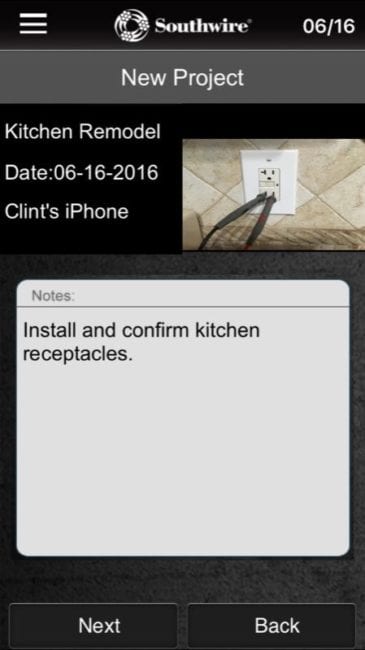
The 15190T connects via Bluetooth to Southwire's MApp application, which runs on iOS and Android smartphones and tablets. The MApp allows the user to view the meter's readings on their phone in real time, from a distance of up to approximately 30 feet—useful for monitoring a measurement from a safe location, or for reading the meter when it is positioned in a hard‑to‑see location. The MApp can also take a screenshot of the current reading, attach photos, GPS location data, and text notes, and organize the captured data into projects. The user can generate a PDF report directly from the app and email it to a supervisor, a client, or an inspector. The MApp's ability to document measurements with photographs and location data transforms the multimeter from a simple measurement tool into a comprehensive documentation platform. For the electrician who needs to prove that a circuit was tested and found to be within specifications, or who needs to provide evidence of a problem to justify a repair, the MApp integration eliminates the need for a separate camera, a notebook, and a manual report‑writing process. The recording, the photograph, the GPS coordinates, and the notes are all captured in a single, integrated workflow.
Conclusion: A Premium Meter for Professionals Who Need More Than Just a Reading
The Southwire 15190T MaintenancePRO Multimeter is not a tool for the casual user or the DIY homeowner. It is a professional‑grade instrument designed for the electrician, the industrial maintenance technician, or the facility manager who needs a meter that can do more than measure voltage and continuity—a meter that can record data, analyze trends, read process control signals, and generate professional reports. The color display, the Bluetooth connectivity, the MApp integration, the onboard recording, and the 4‑20 mA capability set the 15190T apart from the vast majority of multimeters on the market. At $375, it is a significant investment, but for the professional who will use its advanced capabilities regularly, the return on that investment—in time saved, in errors avoided, in documentation generated—is substantial. Southwire has produced a meter that competes with offerings from much larger and more established test and measurement brands, and it has done so with a combination of features, usability, and build quality that is genuinely impressive. For the professional who demands more from their multimeter, the 15190T is a tool that deserves serious consideration.
Comments 0
Leave a Comment